Free for 14 days. Cancel any time before your trial ends.
Anonymous
By design
Encrypted
End-to-end
Audit-ready
Every status change time stamped
What anonymous means here
Your employer can never link a report back to you.
Reports are encrypted on the employee's device. Only the organisation's review team can read them, and they never see who wrote them.
Shared
Your review team sees
The contents of your report
Category, description, date, severity and frequency.
Department and location
Only if you choose to add them. Both are optional.
A random reference ID
So status updates reach you without anyone knowing who you are.
Never shared
Stays with you
Your name and contact details
We never ask for your name, email, phone number or employee ID.
Your device identity
An anonymous identifier tracks seats, never a person.
When and how often you open the app
Usage is never shown to your organisation.
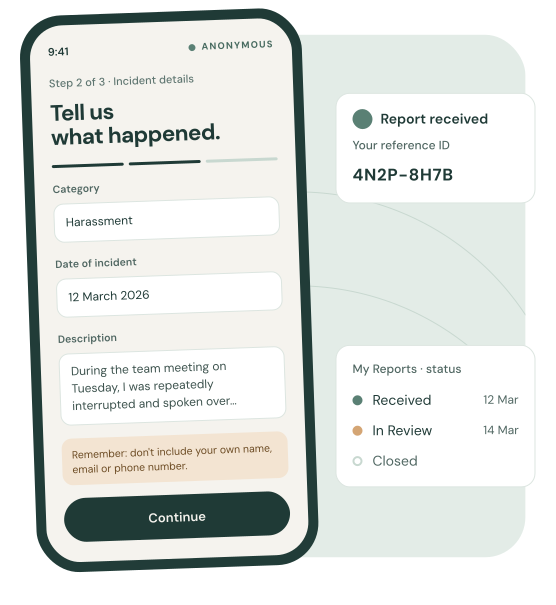
The app reminds employees not to include their own identifying details while writing. Naming other people involved is fine when it's needed to describe what happened.
How it works
From first report to resolution, in four steps.
1
HR team
Share your access code
Every organisation gets one access code. Send it by email, intranet or a poster in the break room.
2
Employee
Join anonymously
Employees enter the code in the iOS or Android app. No account, no name, no work email.
3
Employee
Submit an incident report
Three short steps: category, details, then context. A reference ID confirms it arrived.
4
HR team
Review and respond
Reports land in a secure portal. Move each one from Received to In Review to Closed.
For employees
A calm, private way to say what happened.
Take your time. Describe only what feels manageable, and save to come back later.
This happened to me
I personally experienced this incident.
I witnessed this
It happened to someone else.
Guided three-step flow
Clear prompts for category, date, description, severity and frequency.
My Reports
Check the status of every report with its reference ID.
Privacy guidance built in
Reminders in the flow help keep identifying details out.
For HR and leadership
Structure for every report you receive.
A secure web portal for your review team, with the context you need to act on patterns.
Reports inbox with filters
Filter by status, category, severity and report type.
Internal notes and CSV export
Notes stay visible to your review team only. Export when you need a record.
MFA on every sign-in
Authenticator-app codes are required for every reviewer account.
Multi-reviewer support
Invite trusted HR colleagues to review together.
Acme Corporation · ReportsReports inbox
AllReceivedIn ReviewClosedSeverity ▾Category ▾
Reference
Submitted
Type
Category
Severity
Frequency
Status
4N2P-8H7B
12 Mar 2026
Experienced
Harassment
High
Recurring pattern
In Review
7QK3-2MRD
10 Mar 2026
Witnessed
Discrimination
Medium
Recurring pattern
Received
H8V2-5TLC
28 Feb 2026
Experienced
Exclusion
Low
One-off incident
Closed
P3XN-9WQA
14 Jan 2026
Experienced
Physical Intimidation
Severe
One-off incident
Closed
Example data. Reporter identity is never shown in the portal.4 reports · Status changes are time stamped
Access codes
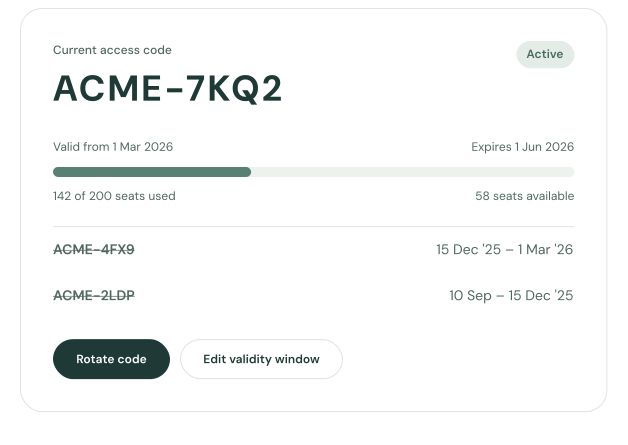
When someone leaves, their access leaves too.
Rotate your organisation's code and anyone who hasn't re-entered the new one loses access. You never need to know who they are.
Set a validity window with start and expiry dates
Rotate or regenerate the code at any time
Each enrolment uses one seat, tracked against your plan
Existing reports are kept when a code changes
Categories that match your policies.
Start with four defaults, then add, rename or hide categories to reflect how your organisation works.
Verbal Abuse
Harassment
Discrimination
Physical Intimidation
Pricing
Plans by team size. Every plan starts with a 14-day free trial.
Billing runs through Stripe. Your trial converts to the plan you choose unless you cancel before it ends.
Prices are in AUD excluding GST. Add seats anytime from your settings.
FAQ and guidance
Questions people ask before they speak up.
For employees using the app, and for organisations deciding what to do with a report.
EmployeesCan my employer find out who I am?
No. Confidely never asks for your name, email, phone number or employee ID. Your review team sees what you wrote, never who wrote it. Leave your own identifying details out of the description to keep it that way.
EmployeesCan I edit a report after submitting?
No. A submitted report stays exactly as you sent it, so your review team and the audit trail match. If you need to add something, submit a new report and mention your original reference ID.
EmployeesHow long until I hear back?
It depends on your organisation's process. Check My Reports at any time with your reference ID. Each move from Received to In Review to Closed shows there with its date.
EmployeesIs there a limit on submissions?
Yes, there is a monthly limit set by your organisation. This is a safeguard against misuse and not a restriction on legitimate reporting. If you reach this limit, you can submit again in the following month. Each incident should be its own report so it can be tracked and responded to separately.
EmployeesHow do I get my organisation's code?
Your HR team shares it, usually by email, on the intranet or on a poster at work. If you can't find it, ask HR for the current code. You don't need to say why.
OrganisationsWhat should we do when we receive a report?
Move it to In Review to show it's being looked at, then follow your usual investigation process. Use internal notes to record what you've done, and close the report once it's resolved. Every status change is time stamped.
No. Confidely gives people a safe way to raise concerns. It works alongside your existing grievance and disciplinary procedures rather than replacing them.
OrganisationsWhat should success look like?
Success isn't necessarily fewer reports. A rise in reporting often means staff trust the system. Over time, look for issues raised earlier before they escalate, greater trust in leadership and lower turnover and conflict.
OrganisationsCan employees submit false or malicious claims?
Like any reporting system, some reports may be inaccurate or made in bad faith. Confidely focuses on patterns over time rather than single allegations. Organisations should still make sure employees never feel discouraged from speaking up for fear of not being believed.
OrganisationsWhat if a report seems exaggerated or unbelievable?
Approach every report professionally and without jumping to conclusions. Some may reflect misunderstandings or incomplete information; others may reveal issues you didn't know about. Assess each one objectively, and don't dismiss information just because it's uncomfortable.
OrganisationsWhat if a report suggests illegal activity?
If a report suggests unlawful conduct such as assault, threats, theft, discrimination, harassment or safety breaches, consider escalating it to your legal team or police. Confidely doesn't replace emergency services or any mandatory reporting obligations.
Give your team a safe way to speak up.
Start a 14-day free trial. Your organisation, plans and first access code are set up automatically.